


Last updated: October 2026
Can Facebook business Pages really only post 2 links a month?
Yes. As of September 2026, Meta limits most non-paying Facebook business Pages to 2 posts with external links per month. More link posts come with a paid Meta One for Business plan (the Advanced tier starts at $49.99/month). Publisher Pages are exempt. Links in ads, links to Meta's own apps, and links in DMs are not part of the cap.
That sounds like a gut punch if your Facebook strategy has been "post the blog, post the menu, post the booking link." But the businesses that adapt fastest are going to come out of this with better engagement, not worse.
What exactly did Facebook change, and when?
Facebook began testing a monthly cap on link posts for Pages and professional-mode profiles in December 2025, then expanded it in September 2026, the same week Meta launched its Meta One for Business subscriptions.
Here's the timeline as reported:
- December 2025: Facebook starts testing a 2-link monthly cap on Pages and professional-mode accounts (TechCrunch, Dec. 17, 2025)
- September 15, 2026: Meta launches Meta One for Business: Essential ($14.99+), Advanced ($49.99+), Expert ($149+), Max ($499+) (TechCrunch, Sept. 15, 2026)
- September 2026: The 2-link cap expands to a much wider set of Pages, with publisher Pages exempt (Social Media Today, Sept. 17, 2026)
According to TechCrunch's September 15 coverage, "support for links in organic posts and reels" is listed as a feature starting at the Advanced tier. Meta also notes that plan benefits, pricing, and availability may vary by region, app, and account, which means two Pages in the same Aurora strip mall could see slightly different rules. If you get the in-app notice, your Page is in.
What still doesn't count against your 2 links (based on what Meta and TechCrunch have reported so far):
- Links inside paid ads
- Links to Facebook, Instagram, WhatsApp, or Threads
- Facebook affiliate links
- Links sent in Messenger DMs
One gray area: the original December 2025 test did not count links in comments, but some reports on the September rollout say comment links now count too. Treat comment links as "might count" until you've confirmed it on your own Page.
Why is Meta limiting links on Facebook Pages?
Meta is limiting links because it wants people to stay on Facebook, and it now has a subscription product to sell to the businesses that still want to send them away.
The data shows how little Facebook has been leaning on links already. According to Meta's own Widely Viewed Content Report, as cited by Social Media Today, only 1.3% of U.S. Feed post views in Q1 2026 included an external link, down from 9.8% in 2022. When TechCrunch first reported the test, a Meta spokesperson said the company was testing "whether the ability to publish an increased volume of posts with links adds additional value" for paying subscribers.
Translation: link posts were already getting less reach, and now they cost money. Neither of those things is a reason to leave Facebook. Both are reasons to stop treating your Page like a link dispenser.
What can you do instead of posting links on Facebook?
The three best workarounds are comment-to-message automations, a single link hub in your Page's profile, and a pinned post that does the linking for you. Use all three together and you can run a full month of calls to action on 2 links (or fewer).
- Comment-to-message automation: Followers comment a keyword, an automation DMs them the link. Uses one of your 2 links? No (DMs aren't posts). Best for: Lead magnets, booking links, offers, anything you want to track.
- Link hub as your Page's main link: One link tree page in your Page's profile, "link in bio" CTAs in posts. Uses one of your 2 links? No, profile fields aren't posts. Best for: Evergreen links: website, menu, booking, reviews.
- Pinned "start here" post: One pinned post holds your link hub URL, every other post says "see pinned post". Uses one of your 2 links? Yes, 1 per month at most. Best for: Pages that want a single click from the feed.
1. Set up comment-to-message automations
A comment-to-message automation is a chatbot that watches your post for a keyword ("Comment QUOTE and I'll send you the link") and instantly sends that person a Messenger DM with the link.
This is the strongest option of the three for two reasons. First, the link lives in a private message, not a post, so it doesn't touch your monthly cap. Second, every comment tells the algorithm your post is worth showing to more people, which is the exact behavior Meta is now rewarding.
You also get something a link post never gave you: a conversation. Once someone is in your DMs, the automation can ask a qualifying question ("Is this for a home in Aurora or somewhere else?"), hand off to a human, or follow up later.
The numbers back this up. A HypeAuditor and Manychat study of 6,000 verified U.S. Instagram creators found that accounts using comment-triggered DM automation got 40% to 150% more comments per post and grew their audience 30% to 140% faster year over year than similar accounts that didn't. In a Manychat case study, business coach Amy Porterfield replaced a webinar landing page with a comment-to-DM flow, and 85% of the people who commented ended up registering, compared to the 30% to 40% she typically saw from landing pages. Both studies are from Instagram, but a Facebook comment-to-DM flow runs on the same mechanics: comment, automatic DM, link.
This is a service we build for clients at Stellar Media Marketing. You can see it on our services page under AI chat automations.
2. Make a link hub your Page's main link
A link hub is one simple page (Linktree, Beacons, or a page on your own website) that lists every link you'd normally post: your booking page, menu, newest blog post, current offer, Google reviews.
Credit where it's due: my friend Jenn Herman (@jenns_trends), an Instagram expert, had this idea. Treat your Facebook Page link exactly like your Instagram link in bio, with one link tree that holds everything. Here's her take:
Put that URL in your Page's website field. Then write captions the way Instagram has trained everyone to read them: "Booking link is on our Page, tap our profile." Because your profile isn't a post, swapping links on the hub page doesn't burn any of your monthly allowance.
Pro tip: build the hub on your own website instead of a third-party tool when you can. You keep the traffic data, and every visit lands on a domain that helps your local SEO.
3. Pin a "start here" post with your link hub
A pinned post sits at the top of your Page, so you can spend one of your 2 monthly links on it and point every other post to it.
- Write a short "Start here" post: who you are, who you help, and your link hub URL.
- Pin it to the top of your Page.
- End your other posts with a CTA like "Details in our pinned post" or "Everything you need is pinned at the top of our Page."
- Refresh it once a month if your offer changes. That's 1 link, leaving 1 in reserve.
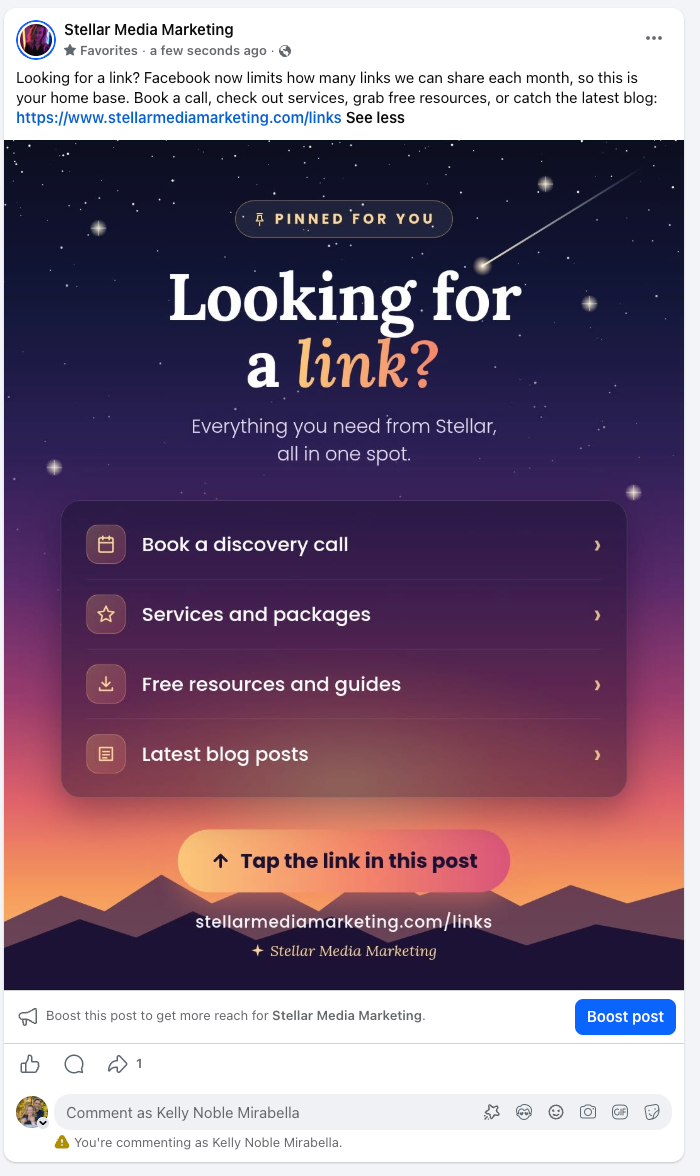
Here's the one we pinned on our own Facebook Page. It points to a links page on our website with four options: book a discovery call, services and packages, free resources and guides, and our latest blog posts. Notice the headline is a question your followers are already asking ("Looking for a link?"), and the call to action tells them exactly what to do: tap the link in this post.
Bonus: links to Facebook posts were exempt in the original test, so you may be able to link straight to your own pinned post from other posts without using your allowance. Test it once and watch for the notice.
What I'm telling my Aurora clients about the Facebook link limit
My plan for the Pages we manage in Aurora and the Denver metro uses two of the three options above, unless a client decides upgrading to Meta One is worth it for them.
- We're pinning their link tree. Each client Page gets a pinned post with their link tree URL, and every other post points people to it. That uses one of their 2 monthly links, at most, and leaves one in reserve.
- We're updating the chat automations they already have. Comment-to-message automation is already running for our clients, so this is a tune-up, not a new build. We're adjusting the keywords and DM flows so they deliver the links that used to go in posts.
"We have options, and none of them require panicking. For most of my clients, a pinned link tree plus the chat automation they already have covers everything a link post used to do. If someone wants to upgrade to Meta One, great, but nobody has to." Kelly Noble Mirabella, Founder, Stellar Media Marketing
Should you pay for Meta One to get more links?
For most local small businesses, no, not just for links. Pay for Meta One only if you'd use the other features too.
- If you post a link 2 or fewer times a month: Stay on the free plan and use the workarounds above.
- If you publish blog posts, events, or listings weekly and Facebook drives real website traffic for you: Run the numbers on Advanced ($49.99+/month) against what that traffic is worth.
- If you already want scheduling, the verified badge, and deeper insights: Meta One may pay for itself, and the extra links are a bonus.
- If you're mostly trying to get calls and bookings: Put that money toward a comment-to-DM automation, which gets people into a conversation instead of onto a page.
Frequently asked questions
Does the Facebook 2-link limit apply to my personal profile?
Not if it's a regular personal profile. According to TechCrunch, the cap applies to Facebook Pages and to profiles with professional mode turned on. If you ever switched your profile to professional mode, check for the in-app notice.
Do links in Facebook comments count toward the limit?
In the original December 2025 test, they did not. Some reports on the September 2026 rollout say comment links now count, so test it on your own Page before relying on it.
Do Facebook ads count toward the 2-link limit?
No. Links in paid ads are not part of the organic link cap. If a link really needs to reach a lot of people, boosting or running it as an ad is still an option.
Does the limit roll over if I don't use my links?
No. Unused link posts reset each month, so there's no point "saving" them. Use your 2 on your highest-value posts, like a pinned post or a major announcement.
Can I still put my website in my Facebook Page's profile?
Yes. The cap applies to posts, not to the website field on your Page. That's why a link hub as your main Page link is one of the easiest fixes.
Is Instagram limiting links too?
Instagram never allowed clickable links in regular captions, which is why "link in bio" exists in the first place. Meta One for Business includes link options on both apps, and the details vary by tier and region.
Are comment-to-DM automations allowed by Meta?
Yes, when they're built on Meta's official Messenger tools and follow its messaging rules. People opt in by commenting, which is exactly the kind of interaction Meta wants to see.
Want help turning your Facebook Page into a conversation instead of a link board?
If you're an Aurora or Denver-area business and the 2-link limit just broke your posting plan, we can help. We set up comment-to-message automations, link hubs, and pinned-post strategies so your Page keeps sending customers your way.
Book a free discovery call or see our services.
Sources
- TechCrunch, "Facebook is testing a link posting limit for professional accounts and Pages," December 17, 2025
- TechCrunch, "Meta expands subscription push with new AI-focused plans," September 15, 2026
- Social Media Today, Andrew Hutchinson, "Facebook Pages get charged for link posts," September 17, 2026
- HypeAuditor and Manychat, "How comment-triggered DMs increase engagement and accelerate audience growth"
- Manychat, "Landing Pages vs. Instagram DM Automation: Which one Made $1.4M for Amy Porterfield?"
- Meta Transparency Center, Widely Viewed Content Report
Changelog: Published October 2026.